Minecraft server hostingThe tick doesn't lie.
Real CPU that's yours alone, never oversold. Live TPS and MSPT on your screen for every core that reports them. You pay while your server is awake — by default it goes back to sleep 8 minutes after the last player leaves, and sleeping costs nothing.
Reading live status…
Your old host lags at prime time. Here's the actual reason.
Minecraft runs the whole world on a single thread: one core, one tick. Put several servers on that core and they take turns with it — prime-time TPS falls apart. We don't do that.
We measured what that costs. Same world, same load, same box — the only difference is how many servers shared the pinned CPU thread.
PAPER 1.21.4 · 2000 villagers · 60s warm-up, 300s sampled · AMD Ryzen 7 9700X 8-Core Processor · 2026-07-25
Method in full · Raw result.json · Three runs that didn't survive review · What this does not show
Several servers per core
- CPU split between neighbours. You lag at peak.
- "Just buy more RAM" (won't fix the tick)
- No TPS graph. You're guessing.
- You pay even while asleep
Guaranteed CPU, never oversold
- Real CPU reserved for your server, sized to your plan, never shared
- Live TPS/MSPT on Paper, Purpur, Forge & NeoForge — and on Vanilla & Fabric from Minecraft 1.20.3
- No overselling, enforced in code — not a promise
- A sleeping server uses nothing, so it costs nothing
Everything you actually touch
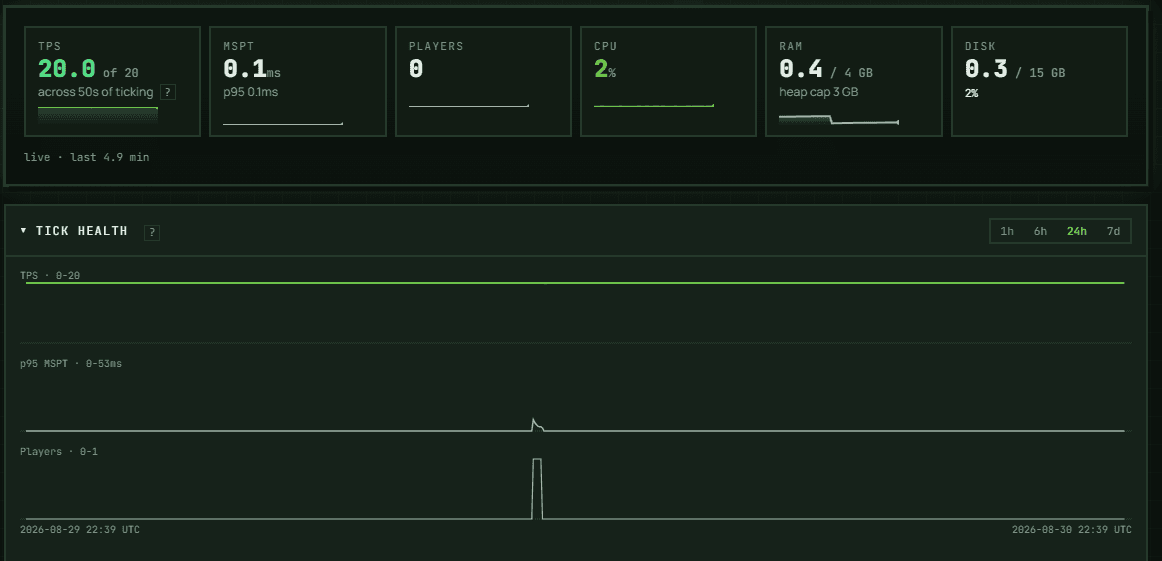
The tick, measured — and 24 hours of it
Live TPS and MSPT, plus the p95 tail on the cores that print percentiles — Paper, Purpur, and Vanilla and Fabric from Minecraft 1.20.3; Forge and NeoForge print no percentile tail at all, and the panel says so. On those same cores, the tick rate itself is counted off the world's own tick counter — what your world actually delivered. Forge and NeoForge report their own achieved rate instead, and that is the number shown. Below 1.20.3, Vanilla and Fabric have no tick command at all, and the panel says so instead of inventing a number.
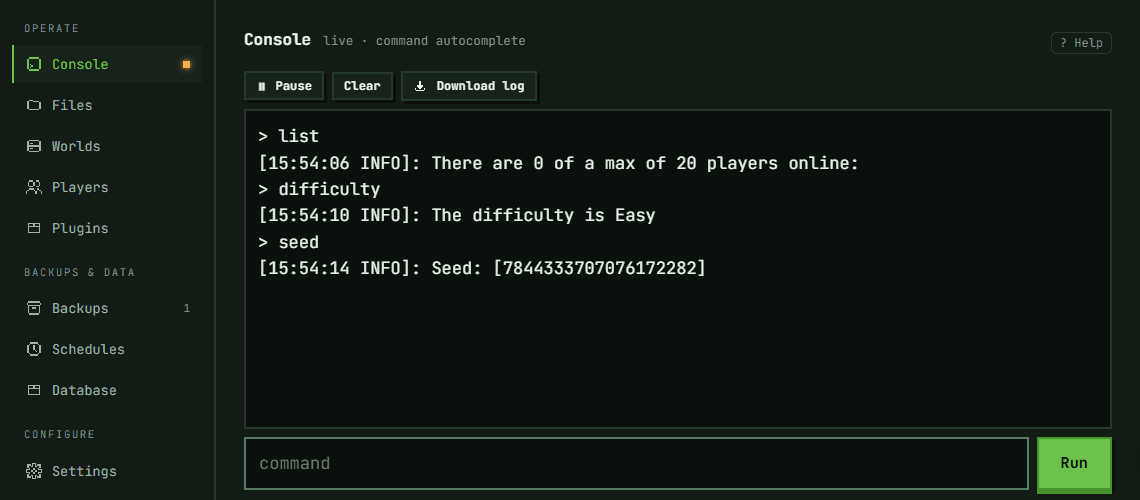
A real console and the whole filesystem, in the browser
Live console with command autocomplete. Full file access: browse, edit, upload, delete — plus SFTP when you would rather use your own client. No desktop client, no waiting on a ticket.
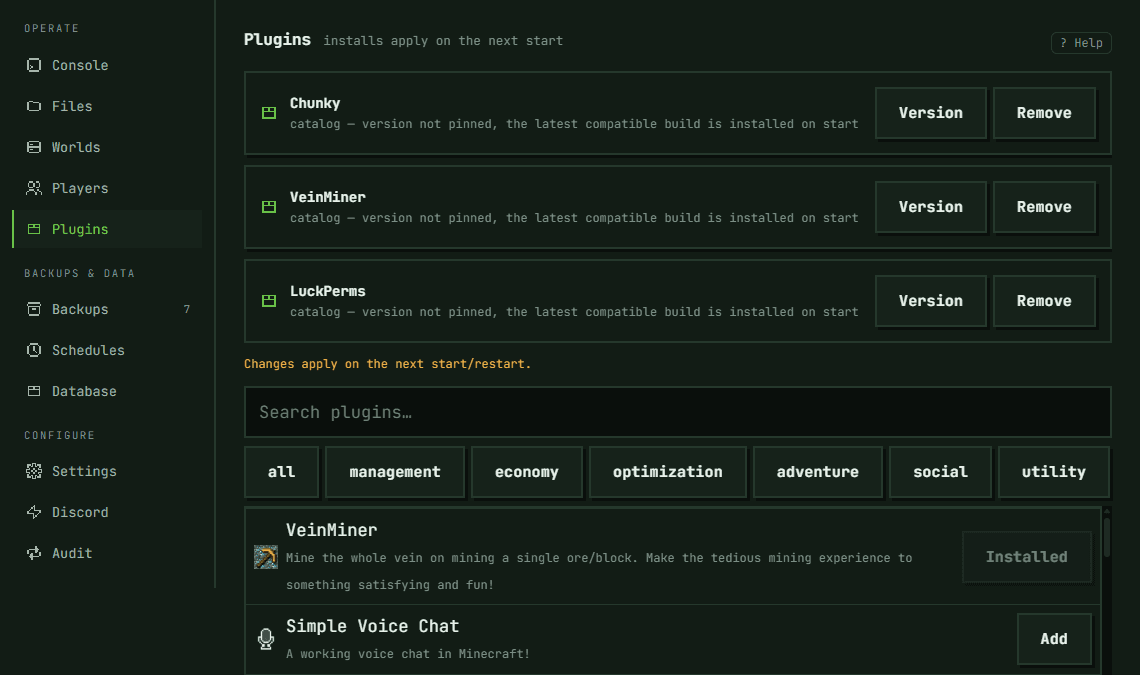
Install from Modrinth without leaving the panel
Search the catalog, click install. Paper and Purpur plugins, and Fabric, Forge and NeoForge modpacks — with the loader checked against the server you are installing onto, so a pack for the wrong loader is refused instead of silently failing at boot.
The rest of what's in the panel
Mods and modpacks
Fabric, Forge and NeoForge, with one-click modpack install from Modrinth. The loader is checked against your server before anything is written.
Bedrock crossplay
One click on the flat plan, on a dedicated Bedrock port. Not yet on metered: a Bedrock join can't wake a sleeping server.
Extra ports
Voice chat and web maps need traffic that doesn't ride the game port. Open one from the panel and it's published and routed.
Backups
Scheduled snapshots, one-click rollback, and a full download you can take with you.
SFTP & databases
SFTP access with any client (FileZilla, WinSCP), plus a MySQL-compatible database per server for plugins that need one (LuckPerms, CoreProtect, and the like).
Teams
Invite teammates by email. Owners control who has access; invited members can manage the server.
Scheduler
Restarts, backups and commands on a timetable you set.
API, CLI and MCP
Everything the panel does is a REST call too — with a TypeScript SDK, a CLI, and an MCP server.
See how much scale-to-zero saves you
By default the server goes to sleep 8 minutes after the last player leaves — you can change that per server — and wakes when someone connects. You pay only for the GB-hours it's awake.
Estimate · 1 GB active hour = $0.012.
Pricing estimate (USD) — not a quote. Metered bills active GB-hours; Flat bills each UTC day a server runs.
Pay by the hour or flat monthly. Switch anytime.
No lock-in, no billing traps. Switch plans or download your data whenever you want.
Free
- 20 active hours / month
- Dedicated CPU share — never oversold
- No queue, no ads, live TPS
- Paper/Purpur/Vanilla + plugins
- Limited slots — claim or join the waitlist
Metered
- Scale-to-zero + wake-on-join
- Guaranteed CPU, never oversold
- Live TPS/MSPT on tick-capable cores
- Web console, file manager, backups
- Perfect for irregular play
Flat 24/7
- Server online around the clock
- Guaranteed CPU, never oversold
- Tiers from 2 GB to 16 GB ($48/mo)
- Everything in Metered
Event
- Beefy cores under load
- Spun up for your date/time
- Velocity network on request
- Pay only for the event window
Pricing estimate (USD) — not a quote. Metered bills active GB-hours; Flat bills each UTC day a server runs.
Moving in, getting help, and driving it from code
Move in without a ticket
Export a .zip from your old host, create a server here, and hit Import world on its page — archive up to 512 MB, world, plugins and configs together. Bigger than that? Upload the files over SFTP instead. If you ever leave, download a backup and take your server's files with you.
Talk to the engineer
When something is off, you reach the people who build the platform — in Discord or at support@truetick.gg. We don't promise a reply time we haven't measured; /contact says why.
Drive it from code
Everything the panel does is a REST call too — with a TypeScript SDK, a CLI that gives Minecraft plugins a live dev loop, and an MCP server so you can run your server from Claude.
Straight answers
Spin one up. Watch the tick for yourself.
Top up by card or PayPal. A sleeping metered server bills nothing.